RingWise (Auto Silencer)2.2.4
Publisher Description
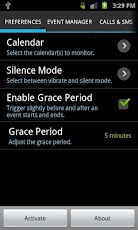
RingWise automatically changes your phone's ring mode to vibrate or silent when you have events planned in your calendar, and it changes the ring mode back to normal when the event ends.Have you ever been in an important meeting only to have your phone ring loudly? With RingWise you don't have to constantly worry about silencing your phone and having to remember to return it back to normal.* Now compatible with ICS (Android 4.0) *Features:- NEW: View a list of all your events for today and know which ones will cause your phone to go to silent.- NEW: Schedule a sleep timer so you don't have to be bothered with waking up in the middle of the night because of a text message or an email.- Automatically activate based on busy/available status of each event.- Receive audible alerts after each event, in order to be reminded of any missed calls or missed messages.- Monitor one or more calendars that are synced with your phone.- Automatically differentiate between events you care about and those that should be ignored by using a customized "flag" in event descriptions.- Ability to set an adjustable grace period in order to trigger slightly before and after an event starts and ends.- Select between vibrate and silent mode.- Ignore all day events.Tags: silent silence vibrate ring ringer silencing ringtone meeting class schedule calendar autosilence
About RingWise (Auto Silencer)
The company that develops RingWise (Auto Silencer) is Behzad Richey. The latest version released by its developer is 2.2.4. This app was rated by 1 users of our site and has an average rating of 3.0.
To install RingWise (Auto Silencer) on your Android device, just click the green Continue To App button above to start the installation process. The app is listed on our website since 2012-12-14 and was downloaded 10 times. We have already checked if the download link is safe, however for your own protection we recommend that you scan the downloaded app with your antivirus. Your antivirus may detect the RingWise (Auto Silencer) as malware as malware if the download link to com.wiseapps.ringwise is broken.
How to install RingWise (Auto Silencer) on your Android device:
- Click on the Continue To App button on our website. This will redirect you to Google Play.
- Once the RingWise (Auto Silencer) is shown in the Google Play listing of your Android device, you can start its download and installation. Tap on the Install button located below the search bar and to the right of the app icon.
- A pop-up window with the permissions required by RingWise (Auto Silencer) will be shown. Click on Accept to continue the process.
- RingWise (Auto Silencer) will be downloaded onto your device, displaying a progress. Once the download completes, the installation will start and you'll get a notification after the installation is finished.
Program Details
System requirements
Download information
Pricing
Version History
version 2.2.4
posted on 2012-12-14
Several fixes and updates
